
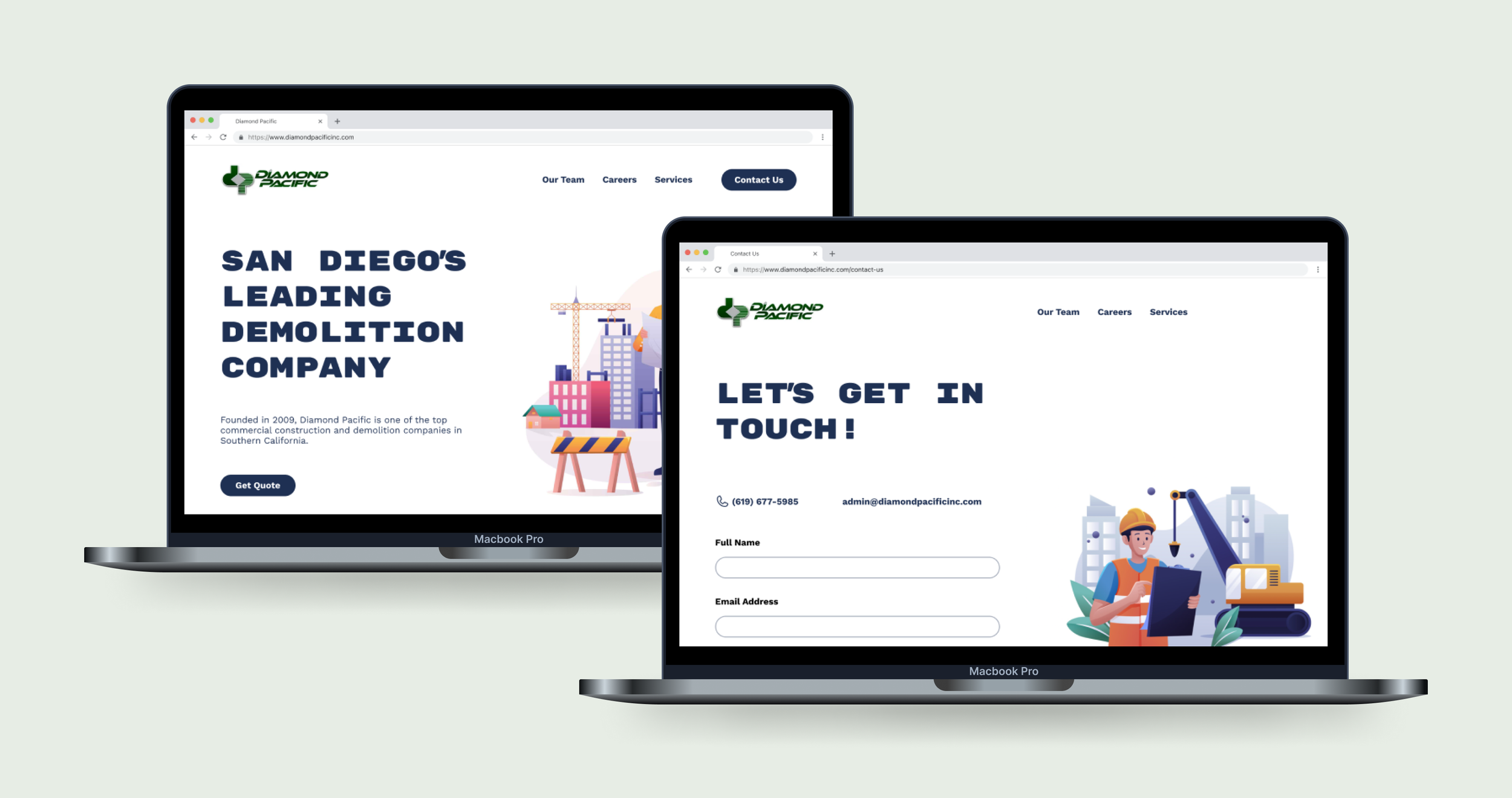
Diamond Pacific Demolition, Inc.
Helping revamp a local business’s website.
Role
UX/UI Designer
Duration
2 weeks
Project Type
Website Redesign
Background
Diamond Pacific Demolition, Inc. is a demolition and general contracting company located in San Diego, CA. It is a family owned-business which was started in 2009 and has since built up a reputation as a reliable, fair company to work with.
Diamond Pacific has seen significant growth in recent years, and has been contracted to complete large-scale, expensive projects with both private and government parties. However, their existing website was not up to par with their reputation, and needed some significant repairs and and modernized redesign.
I reached out to the owners of Diamond Pacific and offered to complete a research-based, user-tested full redesign of their website, and then met with them to discuss their needs.
Gathering Insights
Research
In order to figure out what improvements needed to be made on the site, I needed to utilize a couple of different research methods.
Specifically, I needed to find out two things:
What features are generally offered by Diamond Pacific’s competitors?
What features and company characteristics are potential clients concerned with?
Looking at the competition
I completed a comprehensive competitor analysis on three of Diamond Pacific’s direct competitors. I specifically looked at the following:
A company’s mission statement
Target Audience
Strengths and Weaknesses
Features
From this competitor analysis, I was able to find both important features (such as quote requests, contact pages, and service descriptions) and weak points to capitalize on to make Diamond Pacific stand out.
User Interviews
I talked to five participants with ages ranging from 25-5. In order to accomplish thorough, useful research, it was important to include interviews with users who:
had a history of working with demolition companies or contractors.
owned homes.
had different financial means and goals.
I found that these interviews offered amazing insights into user needs and goals, specifically:
Users want to be able to request a quote easily
Users want to be able to easily contact the company
Users want to be able to see reviews from past clients
Users want to be able to view past projects on social media
Users want to see who runs the company
Users want to know the company’s capabilities as far as project size
Finding patterns in user experiences
In order to better conceptualize the patterns and user goals discussed in user interviews, I moved into affinity mapping. I was able to outline some key topics and user experiences, which ultimately helped me set effective project goals.
Identifying the target audience
With the information and insights offered by looking at competitors and interviewing users, it was now time to create two user personas to better understand my target audience.
Ramping up for wireframing
Creating a Roadmap
To more clearly understand what product I was to create from findings in my research, I needed to accomplish two goals:
Understand who my user was in order to design with more empathy.
Map out how my user would navigate through the product.
Creating project goals
In order to create project goals which meet both user and business needs and goals, I created a Venn diagram to better conceptualize where this project would be heading in the design phase.
Choosing features
With a better understand of where business and user goals may differ and intersect, I could now map out what specific features would accomplish as many as possible for both parties.
Designing the Product
Wireframes and UI
With an understanding of what features to include, as well as project goals that revolve around the user and business, I was able to start working in low-fidelity to move forward with the redesign.
Conceptualizing through sketching
In low-fidelity wireframing, I was trying to mainly map out some kind of structure which could be iterated on throughout the design process. Primarily, I wanted to create low-fidelity designs which would be optimized for user testing before moving up in fidelity.
Keeping the user in the foreground
It’s easy to lose track of user-centered design principles while working on a project, so I completed a round of user testing with my low-fidelity wireframes to ensure the following:
I was including features which matter to users.
I was structuring information in a way that utilized hierarchies of importance and make sense.
Through user testing, completed with five participants, I was able to determine that:
Users generally thought that the low-fidelity wireframes looked good.
I needed to reduce word-load on “Our People” screen.
I needed to prioritize the “Request a Quote” feature .
I should use an accordion in the careers page to make information available and digestible.
I needed to try using carousels for images and reviews, at least in the responsive designs.
Creating interactive prototypes
Usability Testing
With low-fidelity wireframes in hand, as well as valuable user feedback, I was able to move into high-fidelity designs, which I would then prototype and test for usability.
The first thing users will see
Designing a home screen that captured user attention, communicated clearly, and utilized structure and hierarchy was my top priority. I was able to create a home screen which included all necessary information, both existing and new, and utilize alignment and illustrations to create a reliable, yet playful design.
The people who run the business
Showing the hardworking people who own and operate Diamond Pacific was of huge importance, as research indicated that the company’s history and management is a key factor in deciding who to hire for a project. In order to show these items to future clients and employees, I redesigned the team page to better showcase who Diamond Pacific is as an organization.
Designing for future employees
Like any growing organization, Diamond Pacific has needs relating to staffing and employment. Their existing “Careers” page lacked detail and insight into career opportunities at the company. I made these items more intuitive by adding job descriptions, external links, and eye-catching illustrations.
Communicating with users
One of the most important features indicated by users during the research phase was the ability to contact companies they are thinking about hiring. Diamond Pacific’s existing website didn’t prioritize this enough, so I made sure to isolate an easy-to-find, user-friendly contact page.
Designing for mobile
While it is generally standard to design for mobile and then move into responsive frames, Diamond Pacific’s audience generally uses desktop when looking at contractors (an important note revealed during user interviews).
For this reason, I designed for mobile second, which was an interesting change from the method I typically practice.
Testing for usability
With all key screens designed and moved into responsive frames, it was time to conduct usability tests with five participants.
The goals of these tests was primarily to test the general navigation of the site, including using the contact flow and job application flow.
Findings
The usability tests offered valuable insights on how users would navigate the prototype, and also what pain points they encountered.
In relation to my predetermined metrics of success, I found:
No users had more than two pain points while navigating the site.
No user had trouble finding and accessing the contact page.
All users were able to find and explore the job application flow.
All users rated the design’s ease of use as at least a 5 out of 7.
Wrapping Up
Conclusion and Final Prototype
This project taught me a great deal about being a UX designer. Working with an actual client was extremely beneficial and allowed me to gain experience in the world of freelance design work. It was challenging taking requests and turning them into realities, especially with the added pressure, but I found that it forced me to grow as a designer, overall.
found it especially challenging to take an existing product and get creative while trying to keep as many of the same elements as possible. I felt a bit more confined in my creative process, but was ultimately able to make something unique with existing elements. I also found it challenging to signify certain items in an effective way. For example, I found that making cards which show instagram posts was difficult, but ended up deciding on a hover overlay which accomplished the task.
I really enjoyed taking an existing product and revamping it to be more effective. It was fun to think of ways to make a product more productive for an actual business. I also enjoyed the challenge of prototyping that this project offered. It was fun doing research on the old product, and then doing research on my own designs. It showed what users didn’t like, and then allowed me to make sure that I successfully took their concerns and solved them.